
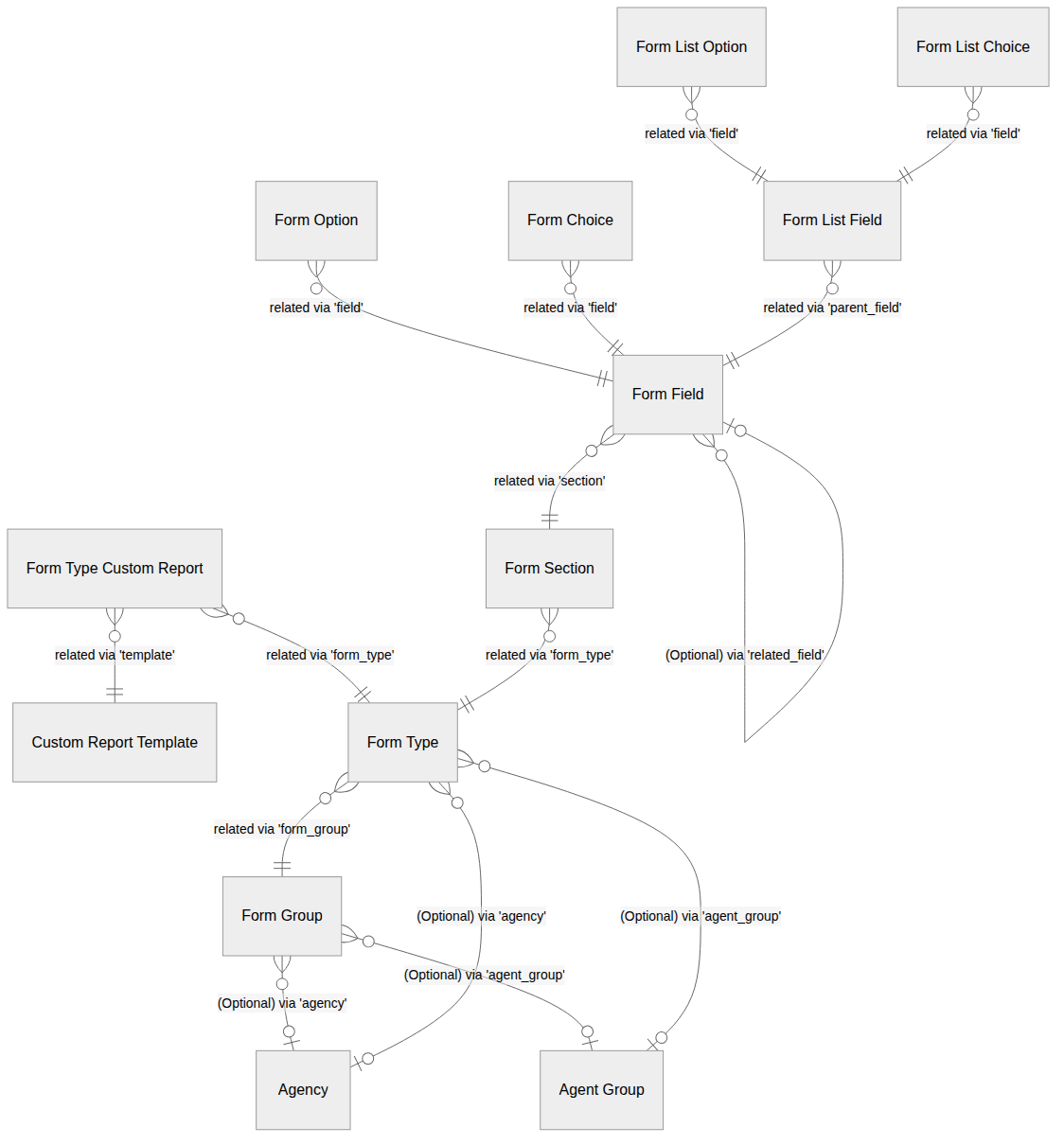
Form Configuration Diagram
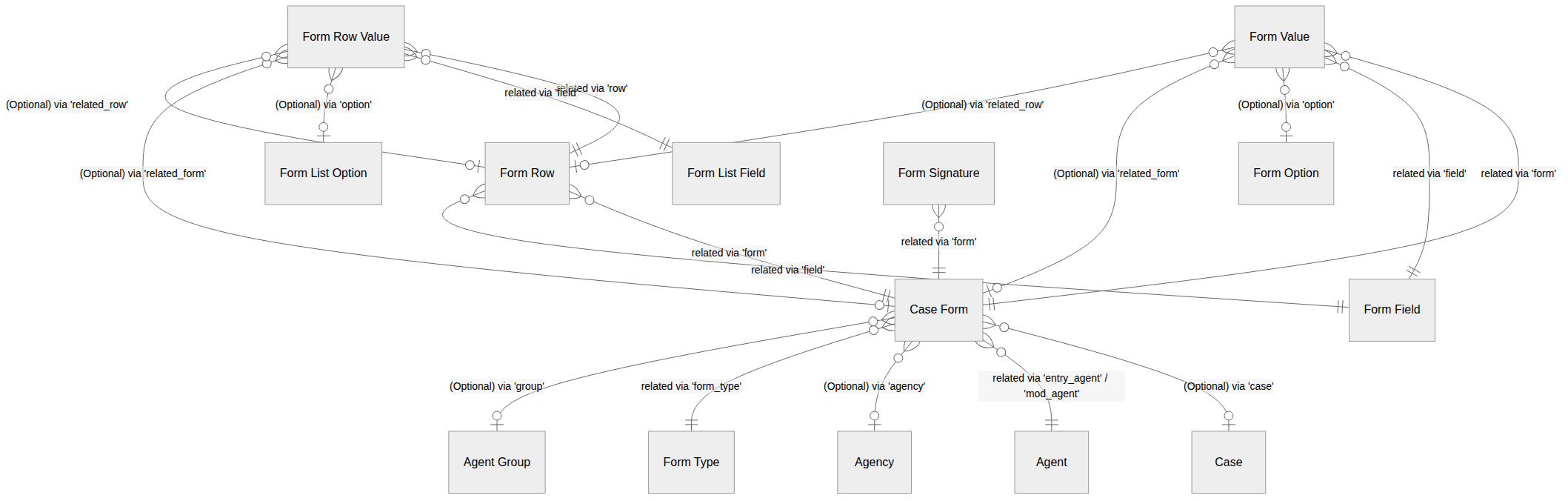
Form Collection Diagram
Case Form
A Case Form is a completed or in-progress submission of a Form Type associated with a Case. A Case Form stores the entry and modification Agent and date, the Agency, a description, a set of completed sections, a privacy flag, a saved state, an optional Agent Group assignment, and flags indicating whether the form is locked or submitted via remote client access.
Form Choice
A Form Choice is a selectable option for a Form Field that uses a checkbox-style input. A Form Choice may control the visibility of other Form Fields, Form Sections, and Form Print Templates when selected.
Form Field
A Form Field is a configurable input element belonging to a Form Section. A Form Field has a field type, display index, and a range of layout and behavioral settings including whether it is required, disabled, hidden by default, and how it behaves in reports. A Form Field may reference another Form Field as a related field.
Form Group
A Form Group is a top-level organizational container for Form Types. A Form Group may be scoped to a specific Agency and Agent Group, and controls whether group-level reports are permitted and whether a signature warning is displayed.
Form List Choice
A Form List Choice is a selectable option for a Form List Field that uses a checkbox-style input.
Form List Option
A Form List Option is a selectable option for a Form List Field that uses a dropdown or select-style input. A Form List Option may control the visibility of other Form List Fields when selected.
Form List Field
A Form List Field is a configurable input element within a repeating list row, associated with a parent Form Field. A Form List Field shares structural properties with a Form Field and controls display and behavioral settings within its list context.
Form Option
A Form Option is a selectable option for a Form Field that uses a dropdown or select-style input. A Form Option may control the visibility of other Form Fields, Form Sections, Form List Fields, and Form Print Templates when selected.
Form Row
A Form Row is a single entry within a repeating list on a Case Form, associated with a specific list-type Form Field. A Form Row stores its position index, saved state, and optional references to a related Case, object ID, and object type.
Form Row Value
A Form Row Value stores the response data submitted for a specific Form List Field within a Form Row. Depending on the Form List Field type, the value may be stored as text, a number, a decimal, a date, a selected option, one or more selected choices, a related Case Form, or a related Form Row.
Form Section
A Form Section is an organizational grouping of Form Fields within a Form Type. A Form Section may be hidden by default and can be disabled.
Form Signature
A Form Signature is a signature record associated with a Case Form. A Form Signature stores the date, a tag identifying the signer role, a printed name, optional label and value metadata, and the rendered output.
Form Type
A Form Type defines a configurable form template belonging to a Form Group. A Form Type may be scoped to a specific Agency and Agent Group, and controls a range of behavioral settings including whether the form can be copied, whether signatures are copied, whether comments are allowed, how modifications and values are displayed, and whether remote client access is permitted.
Form Type Custom Report
A Form Type Custom Report associates a Form Type with a Custom Report Template, enabling the generation of a custom report from form submission data.
Form Value
A Form Value stores the response data submitted for a specific Form Field on a Case Form. Depending on the Form Field type, the value may be stored as text, a number, a decimal, a date, a time, a selected option, one or more selected choices, a related Case Form, or one or more related Form Rows.